Moody Cinematic Man Portrait by a Rainy Window
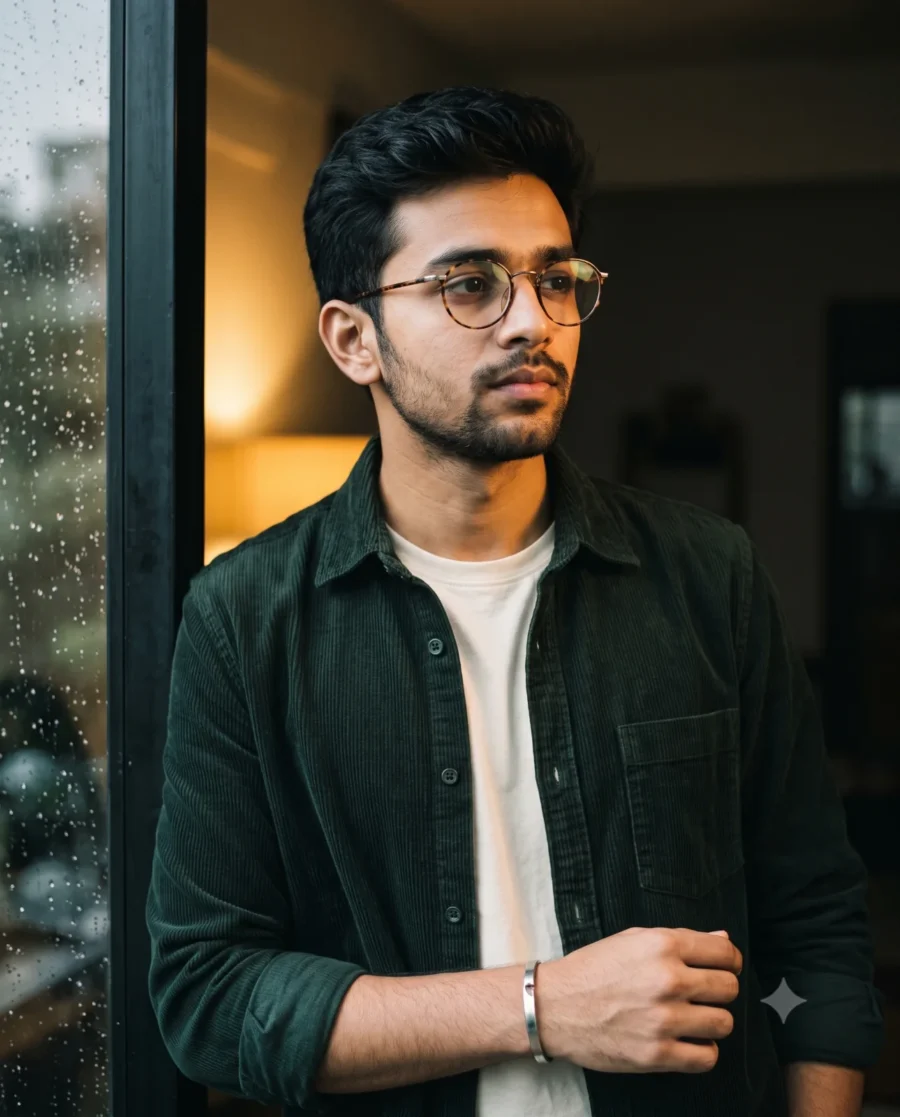
Generate an intimate, magazine-grade cinematic portrait man that captures quiet emotion and timeless style in seconds. This visual concept turns any personal photo into a grounded editorial portrait ready for modern digital platforms. You get tactile fabric detail, warm lighting, and natural expression without booking a professional studio session. It delivers an immediate visual hook that commands attention across any timeline.
Rich Amber Lighting and Textures for a Cinematic Portrait Man
The scene pairs warm interior tungsten lighting with a cool, shadowed background to create natural visual depth. Soft amber light washes across the subject’s jawline, dark textured hair, and the distinct ribbing of a forest-green corduroy overshirt layered over an off-white crewneck. Understated accessories like vintage tortoiseshell frames and a silver cuff bracelet add authentic character. In the foreground, raindrops dotted across a softly blurred windowpane produce dreamy bokeh circles and a layered, atmospheric feel. A shallow depth of field sharpens focus on the subject’s contemplative gaze while preserving realistic skin textures, framing a moment that feels human, quiet, and cinematic.
This style works great for:
- Instagram Profile Picture: An artistic, moody square crop that makes your personal grid feel curated and professional.
- LinkedIn Featured Image: A refined half-body header graphic that adds subtle creative flair while maintaining a clean look.
- Pinterest Aesthetic Board: A vertical 4:5 pin designed for digital fashion, menswear styling, and photography inspiration feeds.
The subtle interplay of golden interior light, rainy window reflections, and understated styling creates an atmosphere that lingers. Copy the prompt above and pair it with your own portrait photo to achieve this filmic aesthetic effortlessly.
Pro Tip:
Cinematic color grading often deepens dark tones to build drama, which can occasionally hide fine fabric texture in shadowed areas. If you want more shadow definition, simply add “soft fill light on shadows” to your prompt or bump the exposure shadows slider slightly in post.